Overview
💪Exercise💪 (self-guided): PromQL — read and verify PromQL queries on the workshop cluster.
Architecture
Prometheus follows a pull-based architecture with a multi-dimensional data model built for modern, dynamic infrastructure.
Core Components
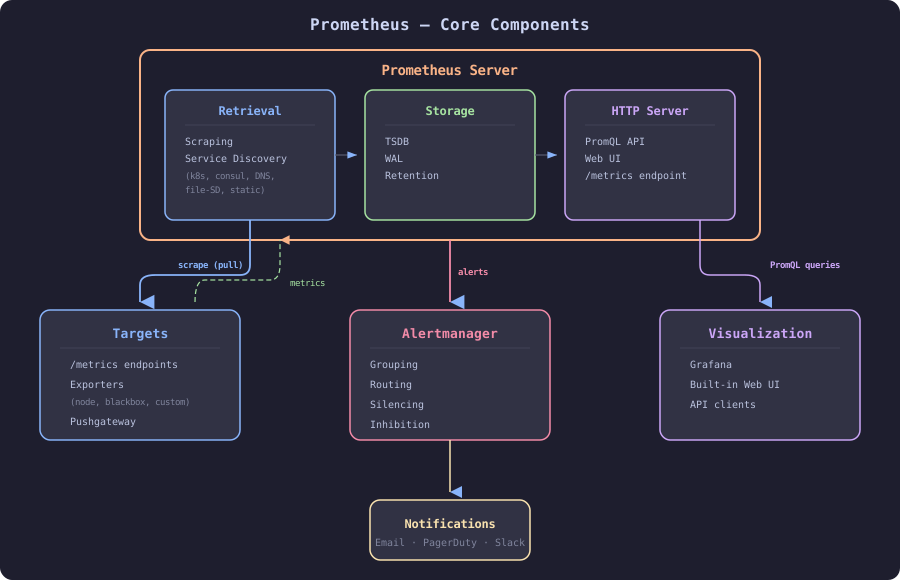
1. Prometheus Server (core component)
- Retrieval: scrapes metrics from targets via HTTP
- Storage: local time-series database (TSDB)
- Query engine: executes PromQL queries
2. Targets (monitored applications/services)
- Instrumented applications: expose
/metricsendpoint - Exporters: translate third-party metrics to Prometheus format
- Node Exporter (hardware and OS metrics)
- Blackbox Exporter (probing endpoints)
- Custom exporters (databases, message queues, etc.)
- Pushgateway: for short-lived batch jobs (not recommended for regular use)
3. Service Discovery
- Static configuration: manually defined targets
- Dynamic discovery: automatic target detection
- Kubernetes
- Consul
- EC2
- Azure
- File-based SD
- Custom integrations
4. Alertmanager (separate component)
- Receives alerts from Prometheus server
- Grouping: combines similar alerts
- Routing: sends alerts to appropriate receivers
- Silencing: temporary muting of alerts
- Inhibition: suppresses alerts based on other alerts
- Deduplication: prevents duplicate notifications
5. Visualization & Querying
- Built-in Web UI: basic graphs and expression browser
- Grafana: most popular visualization tool
- API clients: custom dashboards and integrations
6. Remote Storage (optional)
- Remote Write: send metrics to long-term storage
- Remote Read: query historical data from external systems
- Integrations: Thanos, Cortex, VictoriaMetrics, Mimir
Data Flow
1. Service Discovery → Prometheus discovers targets
2. Scraping → Prometheus pulls metrics every 15s (default)
3. Storage → Metrics stored in local TSDB
4. Evaluation → Recording rules and alerting rules evaluated
5. Alertmanager → Triggered alerts sent to Alertmanager
6. Notification → Users receive alerts via configured channels
7. Query → Users/dashboards query metrics via PromQL
Scraping process:
Target (/metrics endpoint)
    ↓
Prometheus HTTP GET
    ↓
Parsing (Prometheus text format or protobuf)
    ↓
Relabeling (metric_relabel_configs)
    ↓
Ingestion into TSDB
    ↓
Available for queries
Key Architectural Principles
1. Pull-based model
- Prometheus actively scrapes targets
- Advantages:
- Better control over scrape frequency and timeouts
- Easy to detect if target is down (
upmetric) - No need to configure each target with server address
- Targets can be behind NAT/firewall (with PushProx)
- Trade-offs:
- Requires network access to targets
- Short-lived jobs need Pushgateway (with caveats)
2. Multi-dimensional data model
http_requests_total{method="GET", status="200", handler="/api/users"}
- Metric name: identifies what is being measured
- Labels: dimensions for filtering and aggregating
- Flexibility: aggregate across any label dimension
3. Local storage (no clustering)
- TSDB optimized for time series data
- No distributed storage required (simpler operations)
- Retention policy: configurable data retention
- Horizontal scaling: federation or remote storage integrations
4. Powerful query language (PromQL)
rate(http_requests_total[5m])
histogram_quantile(0.95, rate(http_request_duration_seconds_bucket[5m]))
sum by (instance) (rate(cpu_seconds_total{mode!="idle"}[5m]))
- Functional language for time series manipulation
- Built-in functions: rate, sum, avg, quantile, etc.
- Range vectors: operate on time ranges
5. Push gateway as exception
- Only for batch jobs at service level
- Not recommended for regular applications
- Reasons: loses automatic health checking, introduces SPOF
6. Autonomous operation
- Single binary: easy deployment
- No external dependencies: runs standalone
- Configuration via YAML: simple and declarative
- Reloadable:
SIGHUPsignal reloads configuration
7. Service discovery integration
- Kubernetes: pod, service, endpoint, node discovery
- Cloud providers: AWS, Azure, GCP auto-discovery
- DNS-SD: DNS-based service discovery
- File-SD: for custom integrations
8. Alert separation
- Prometheus: evaluates alert rules, fires alerts
- Alertmanager: handles alert routing and notification
- Separation of concerns: monitoring and alert management decoupled
Auto-Scaling — Why It Doesn’t Apply (and What to Do Instead)
Prometheus is a single-binary, stateful application with a local TSDB. Traditional Horizontal Pod Autoscaler (HPA) does not work here — you cannot just add more replicas and expect them to share work. Each instance scrapes independently and maintains its own storage.
What Happens If You Just Add Replicas?
- Each replica scrapes the same targets → duplicate data, double the load on targets
- Each replica has its own TSDB → no shared state, no query deduplication
- PromQL queries hit only one instance → incomplete results unless you add a layer above (Thanos, Mimir)
Scaling Strategies
1. Vertical scaling (VPA)
- Increase CPU/memory when scrape volume grows
- Use Vertical Pod Autoscaler in Kubernetes
- Monitor
prometheus_tsdb_head_seriesandprocess_resident_memory_bytesfor sizing
2. Functional sharding
- Split targets across multiple Prometheus instances by job, namespace, or team
- Each instance scrapes a disjoint set of targets
- Use hashmod relabeling for automatic sharding:
```yaml
relabel_configs:
- source_labels: [address] modulus: 3 # number of shards target_label: __tmp_hash action: hashmod
- source_labels: [__tmp_hash] regex: 0 # this instance handles shard 0 action: keep ```
3. Federation (for aggregation)
- Multiple lower-level instances → one global instance scraping pre-aggregated metrics
- See Federation
4. Offload to remote write
- Keep Prometheus for recent data + alerting
- Send metrics via remote write to a horizontally scalable backend (Mimir, Thanos, VictoriaMetrics)
- See Remote Write
Alertmanager — Can Be Scaled
Unlike Prometheus server, Alertmanager supports clustering natively:
- Run 2-3 replicas with
--cluster.peerflags - Alerts are deduplicated across replicas via gossip protocol
- This is a valid HA setup, but not auto-scaling — the number of replicas is fixed
Key Metrics for Sizing Decisions
# Total active series — main driver of memory usage
prometheus_tsdb_head_series

# Scrape duration — if too long, Prometheus can't keep up
prometheus_target_interval_length_seconds{quantile="0.99"}

# Samples ingested per second
rate(prometheus_tsdb_head_samples_appended_total[5m])

# Memory usage
process_resident_memory_bytes

# WAL size — indicates write pressure
prometheus_tsdb_wal_storage_size_bytes
Rule of Thumb
| Active series | Recommended approach |
|---|---|
| < 1M | Single Prometheus, vertical scaling |
| 1M – 10M | Functional sharding (2-5 instances) |
| > 10M | Sharding + remote write to Mimir/Thanos |